BusinessPDF · 2 pages
Business planning and evaluation checklist
Buyer questions for business leadership, IT and finance, plus a reusable service-risk and investment worksheet.
For Businesses
Version 1.255 KB
Download PDFView Business pack Asset Management
Use the technology estate as evidence for service and investment decisions.
The health check is an indicative questionnaire. For platform access and onboarding, request a conversation.
An inventory helps reveal what is known and what needs checking. Replacement decisions also depend on service needs, condition and support.
Bring available asset information into a defined inventory scope.
Review data completeness, assignments and lifecycle assumptions.
Use the reviewed inventory to discuss replacement priorities and costs.
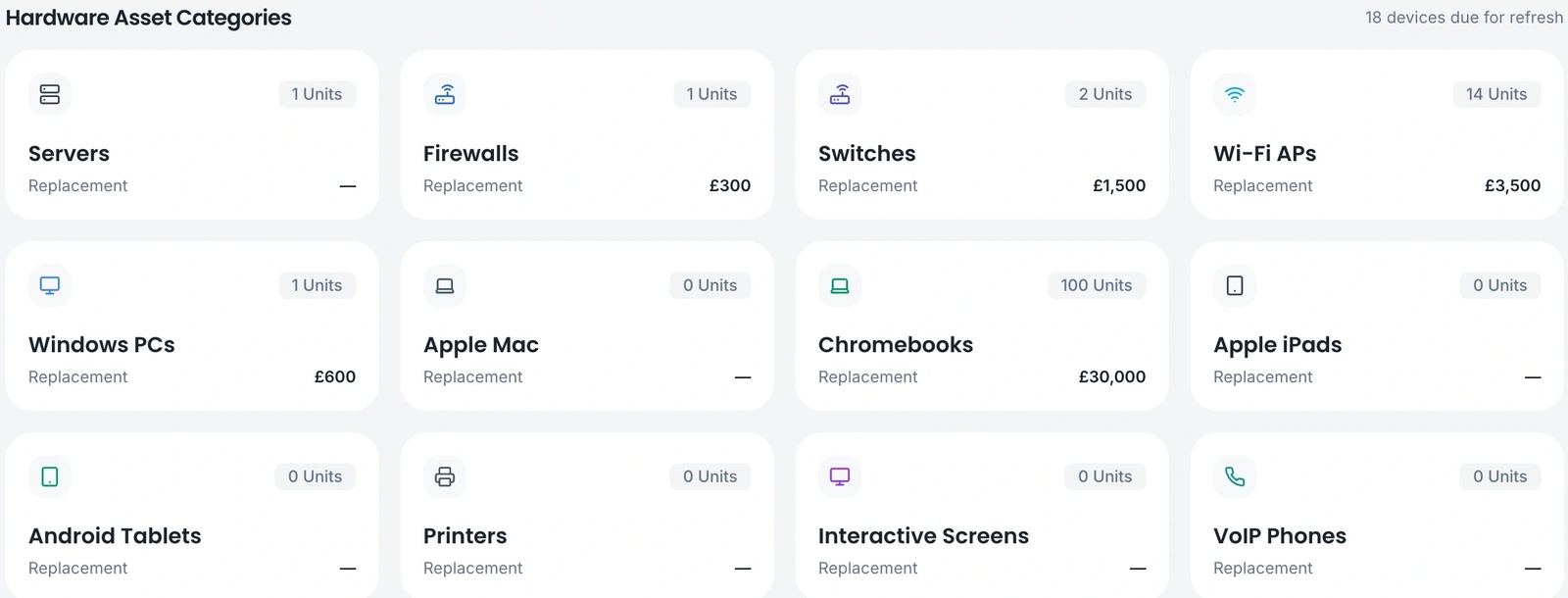
Example product view · demonstration data
Review categories and replacement estimates alongside assessment findings. Investigate gaps before treating the inventory as a complete picture.
Collection methods and coverage depend on configuration. An inventory is not a guarantee that every asset has been discovered. The illustrated school demonstration shows the planning structure; agree a business-specific assessment scope during onboarding.
Understand scope, responsibilities and the next step before you enquire.
Coverage depends on data sources, configuration and the devices in scope. Reconcile imported or discovered information with local records and review missing or unassigned assets.
No. Review condition, security support, workload and business or teaching requirements alongside age. Replacement estimates are inputs to a decision.
Identify the organisations and sites in scope, the people who own decisions, your available asset information and the frameworks you want to assess. Discuss any integrations or Windows-agent requirements before enabling them.
Material for Business. Download, share and discuss. No form or account needed.
Buyer questions for business leadership, IT and finance, plus a reusable service-risk and investment worksheet.
For Businesses
A fictional two-location business review linking service risks, device replacement and network priorities to a three-year planning discussion.
For Businesses
Tell us about your organisation, priorities and any existing IT partner. We review your enquiry and pass relevant details to our distributor, who can coordinate a suitable partner or handle larger customers directly.
We will discuss scope and onboarding before access is arranged. This request does not book a demo or activate an account.