    LoginContact us
    Contact usLogin
    1. Home
    2. /
    3. Education resources
    4. /
    5. School IT Audit Guide
    PRACTICAL GUIDE FOR SCHOOLS AND MATS

    A Complete Guide to School IT Audits

    Guidance and public resources updated 10 October 2026.

    A school IT audit establishes a reliable view of your technology, evidence, risks and future investment needs.

    A complete audit should examine more than hardware. It should consider infrastructure, cyber security, filtering and monitoring, digital leadership, asset lifecycles, service delivery, resilience and the school's ability to support teaching and operations.

    Start a free school IT health checkSee how asitplan supports school IT audits

    The health check is an indicative questionnaire. It does not replace a complete audit.

    School technical overview with findings, review tasks, setup reminders and equipment links; demonstration data

    On this page

    What is a school IT audit?Types of school IT auditWhat should it include?Who should be involved?Evidence checklistExpected outputsAudit, strategise, achieveRAG scoring warningReview frequencyAudit with asitplan

    What is a school IT audit?

    A school IT audit is a structured review of the technology, systems, evidence and governance supporting a school or Multi-Academy Trust.

    The audit records the current position, identifies risks and gaps, tests whether important controls are supported by evidence, and provides leadership with prioritised recommendations.

    The output should not be only a technical inventory or a list of problems. It should explain what matters, why it matters, what should happen next and how improvement can be planned and funded.

    Not every school IT audit answers the same question

    The term "IT audit" is frequently used to describe entirely different processes. Understanding these differences is essential before commissioning or conducting a review.

    Infrastructure audit

    Reviews networks, wireless connectivity, switching, cabling, servers, storage, internet connectivity and technical resilience.

    Cyber-security audit

    Reviews accounts, privileges, devices, vulnerabilities, backups, recovery, incident response and security governance.

    DfE standards assessment

    Reviews the school's current position and evidence against the published DfE Digital and Technology Standards.

    Filtering and monitoring review

    Brings safeguarding, leadership and technical evidence together to review whether filtering and monitoring arrangements remain appropriate.

    IT-service or MSP review

    Reviews support responsibilities, service evidence, strategic advice, documentation, escalation and value delivered by an internal team or external provider.

    Full strategic IT audit

    Combines the technical, governance, asset, financial and service perspectives into one current-state baseline and improvement roadmap.

    Note: asitplan's recommended approach is a full strategic audit supported by focused reviews where a risk or requirement needs deeper analysis.

    What should a school IT audit include?

    1. Leadership and governance

    Review:

    • accountable leadership
    • digital strategy
    • decision-making
    • risk ownership
    • reporting to governors or trustees
    • connection to the school-improvement and financial-planning process

    2. Internet and connectivity

    Review:

    • current service
    • capacity
    • dependencies
    • continuity
    • filtering dependencies
    • supplier and contract information

    3. Networks and wireless

    Review:

    • switching
    • wireless coverage and capacity
    • cabling
    • network management
    • support status
    • resilience
    • diagrams and documentation

    4. Cyber security and identity

    Review:

    • user accounts
    • privileged access
    • MFA
    • security configuration
    • patching
    • supported software
    • threat protection
    • incident response

    5. Filtering and monitoring

    Review:

    • ownership
    • policy
    • technical configuration
    • annual review
    • supervised testing
    • escalation
    • evidence and resulting actions

    6. Backup, recovery and continuity

    Review:

    • data and system scope
    • backup arrangements
    • recovery ownership
    • test results
    • recovery dependencies
    • business-continuity arrangements

    7. Devices and asset lifecycle

    Review:

    • inventory accuracy
    • assignment
    • support status
    • warranty
    • condition
    • usage
    • lifecycle policies
    • repair, replacement and retirement decisions

    8. Cloud services and applications

    Review:

    • service ownership
    • access
    • data
    • contracts
    • duplication
    • backup
    • integration
    • supplier dependency
    • exit planning

    9. IT support and service delivery

    Review:

    • responsibility
    • support scope
    • service levels
    • documentation
    • escalation
    • recurring issues
    • improvement planning
    • strategic advice

    10. Teaching, accessibility and user needs

    Review:

    • suitability of devices and services
    • accessibility
    • staff capability
    • curriculum needs
    • avoidable barriers
    • training and adoption

    11. Cost and future investment

    Review:

    • recurring costs
    • contracts
    • asset replacement
    • known projects
    • technical debt
    • risk exposure
    • budget dependencies
    • phased investment

    12. Evidence and reporting

    Review:

    • evidence quality
    • ownership
    • dates
    • gaps
    • confidence
    • recommendations
    • approvals
    • progress monitoring

    Who should be involved?

    A school IT audit should not be completed by the technology provider in isolation. Technical specialists can supply evidence and advice, but leadership, safeguarding and financial decisions require the appropriate organisational owners.

    ParticipantContribution
    Senior leadershipObjectives, ownership, risk and priorities
    School business or finance leadContracts, costs, procurement and budgeting
    IT lead or providerTechnical evidence, configuration and dependencies
    DSL or safeguarding leadFiltering, monitoring and online-safety context
    Data-protection responsibilityData-processing and information-governance context
    Curriculum or teaching representationUser need, teaching impact and adoption
    Governors or trusteesOversight, challenge and accepted-risk assurance

    Exact responsibilities will vary according to local governance, employment arrangements and support contracts.

    What evidence should be available?

    Organisation and governance

    • • digital strategy
    • • current risk register
    • • leadership ownership
    • • relevant meeting and approval records
    • • current improvement roadmap

    Infrastructure

    • • network diagram
    • • switch and wireless inventory
    • • internet-service information
    • • cabling records
    • • server and storage inventory

    Security

    • • asset and system register
    • • privileged-access review
    • • patching or security-update reporting
    • • incident plan
    • • recovery-test results
    • • relevant staff-training records

    Filtering and monitoring

    • • latest review
    • • provider information
    • • testing evidence
    • • roles and escalation
    • • identified actions

    Assets and finance

    • • asset register
    • • warranties
    • • licence and contract register
    • • support status
    • • replacement assumptions
    • • planned expenditure

    Support

    • • service specification
    • • SLA
    • • ticket reporting
    • • escalation process
    • • recurring-issue analysis
    • • service-review records

    Evidence Quality Note

    A verbal assurance or an undated screenshot may help identify where to investigate, but stronger assurance normally comes from current, attributable and reproducible evidence.

    What should a school receive after the audit?

    A valuable audit should produce actionable outputs, not just a static document.

    1

    Executive summary

    A concise explanation of the current position, material risks and decisions required.

    2

    Findings register

    Each finding should identify the affected area, supporting evidence, impact and confidence in the conclusion.

    3

    Prioritised recommendations

    Recommendations should distinguish immediate risk treatment, planned improvement, routine maintenance and accepted exceptions.

    4

    Asset and lifecycle exposure

    Leadership should be able to see which replacement needs are likely to affect future budgets and which assumptions support the forecast.

    5

    Costed roadmap

    Actions should be phased according to risk, dependency, affordability and organisational capacity.

    6

    Ownership and review points

    Every approved action should have accountable ownership, a target review point and expected completion evidence.

    7

    Leadership reporting

    Governors or trustees should receive a proportionate view of material risk, agreed investment and progress.

    From audit to measurable improvement

    audit

    Establish the truth

    Bring current assessments, asset information and evidence into one consistent baseline.

    strategise

    Decide what happens next

    Prioritise findings, identify dependencies and turn recommendations into a phased, costed roadmap.

    achieve

    Evidence improvement

    Structure actions, record progress and maintain a clear view of remaining risk and completed work.

    A RAG score is only useful when the evidence is clear

    Red, amber and green ratings can help leadership see patterns, but the colour alone is not the audit.

    Each rating should be supported by:

    • the assessment question
    • the evidence reviewed
    • the reason for the conclusion
    • the risk or impact
    • any dependency
    • the recommended treatment
    • the next review point

    A green result should not remain green indefinitely without review, and a red result does not automatically mean immediate replacement.

    How frequently should audits be reviewed?

    There is no single review frequency that is appropriate for every part of a school's technology environment.

    The full baseline should be reviewed at an agreed interval, while individual evidence should also be reconsidered when:

    • guidance changes
    • important technology is replaced
    • a supplier or support model changes
    • a significant incident occurs
    • a school joins or leaves a trust
    • material risks are identified
    • financial assumptions change
    • existing evidence becomes stale

    The audit should therefore be treated as a maintained management process rather than a document produced and then filed.

    Practical school IT audit resources

    Material for Education. Download, share and discuss. No form or account needed.

    Education downloads
    EducationPDF · 2 pages

    Education planning and evaluation checklist

    Questions for school and MAT buyers, plus a reusable school evidence, action and investment worksheet.

    For Schools, Multi-Academy Trusts

    Version 1.210 October 202655 KB
    Download PDFView Education pack
    EducationPDF · 4 pages

    Education example report and roadmap

    A fictional school review with evidence gaps, school and trust responsibilities, a three-year hardware plan and explicit cost exclusions.

    For Schools, Multi-Academy Trusts

    Version 1.210 October 2026169 KB
    Download PDFView Education pack

    Leadership briefing

    Who do we ask when school IT needs a decision?

    A teacher needs a new app. The office needs a replacement laptop. A parent asks about online safety. These requests may all involve IT, but they need different people to help.

    Published 29 October 2026

    Article

    DfE digital standards: where should a school start?

    The Department for Education's digital standards cover many parts of school IT. You do not need to understand every technical detail before using them. Start with a school need and involve the colleagues who can check it.

    Published 7 August 2026Updated 26 October 2026

    Practical guide

    How to plan school IT costs for the next three years

    A three-year IT budget should help colleagues understand what the school needs, when it needs it and what the likely costs include. It can do that without a complicated scoring model or a list of unexplained specifications.

    Published 6 August 2026Updated 29 October 2026

    Keep your school IT audit current with asitplan

    asitplan brings structured assessments, evidence, asset information and improvement planning into one platform.

    Use the platform to establish the current position, identify gaps, organise recommendations and build a costed roadmap for leadership.

    Explore the audit platformStart a free health check
    • structured questionnaires
    • evidence capture
    • RAG assessment
    • framework mapping
    • asset information
    • lifecycle planning
    • roadmap creation
    • leadership reporting

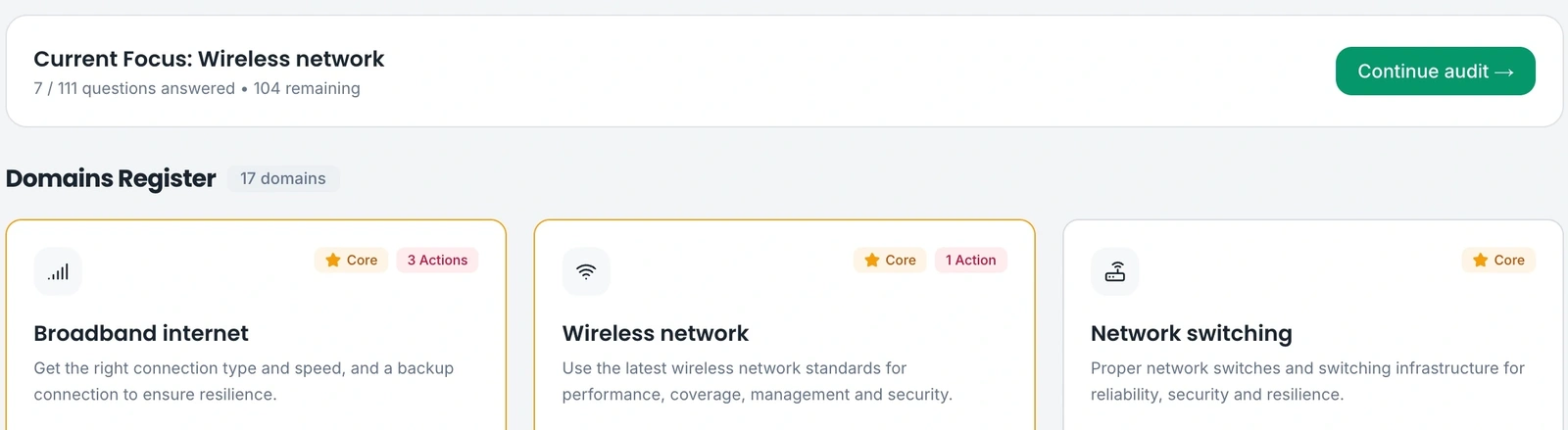
    Example product view · demonstration data

    See the evidence behind the assessment

    Structured questions help teams record their current position and identify what needs review. Use that evidence to support the next decision.

    Question completion is not a compliance score. Missing evidence must remain visible and findings require review.

    School assessment domain register and current review focus; demonstration data
    Assessment domains and review focus · demonstration data. Example figures are not measured customer outcomes.

    Current primary guidance

    Use the published requirements when defining scope and checking evidence. Product examples support planning; they are not certification.

    DfE digital and technology standards (opens in a new tab)

    See how this would work for your organisation

    Tell us about your organisation, priorities and any existing IT partner. We review your enquiry and pass relevant details to our distributor, who can coordinate a suitable partner or handle larger customers directly.

    We will discuss scope and onboarding before access is arranged. This request does not book a demo or activate an account.

    Request a demo Discuss pricing

    © 2026 asitplan ltd.
    Registered in England & Wales.

    YouTubeLinkedInXBluesky
    audit strategise achieve
    Contact usProduct roadmapFAQPrivacy PolicyTerms of ServiceData Processing
    EducationBusinessesIT providers
    School IT AuditDfE Digital StandardsAsset ManagementBudget ForecastingMAT IT ManagementCyber Essentials